
Unity3D Local Multiplayer Character Select Screen
This is my attempt at a character select screen for a local multiplayer game that my friends and I were developing for my senior project called Rift Rave. Some of the challenges of this script was allowing each human-controlled player to select their character simultaneously as Unity's UI system does not normally allow for multiple controllers to have control over the UI.
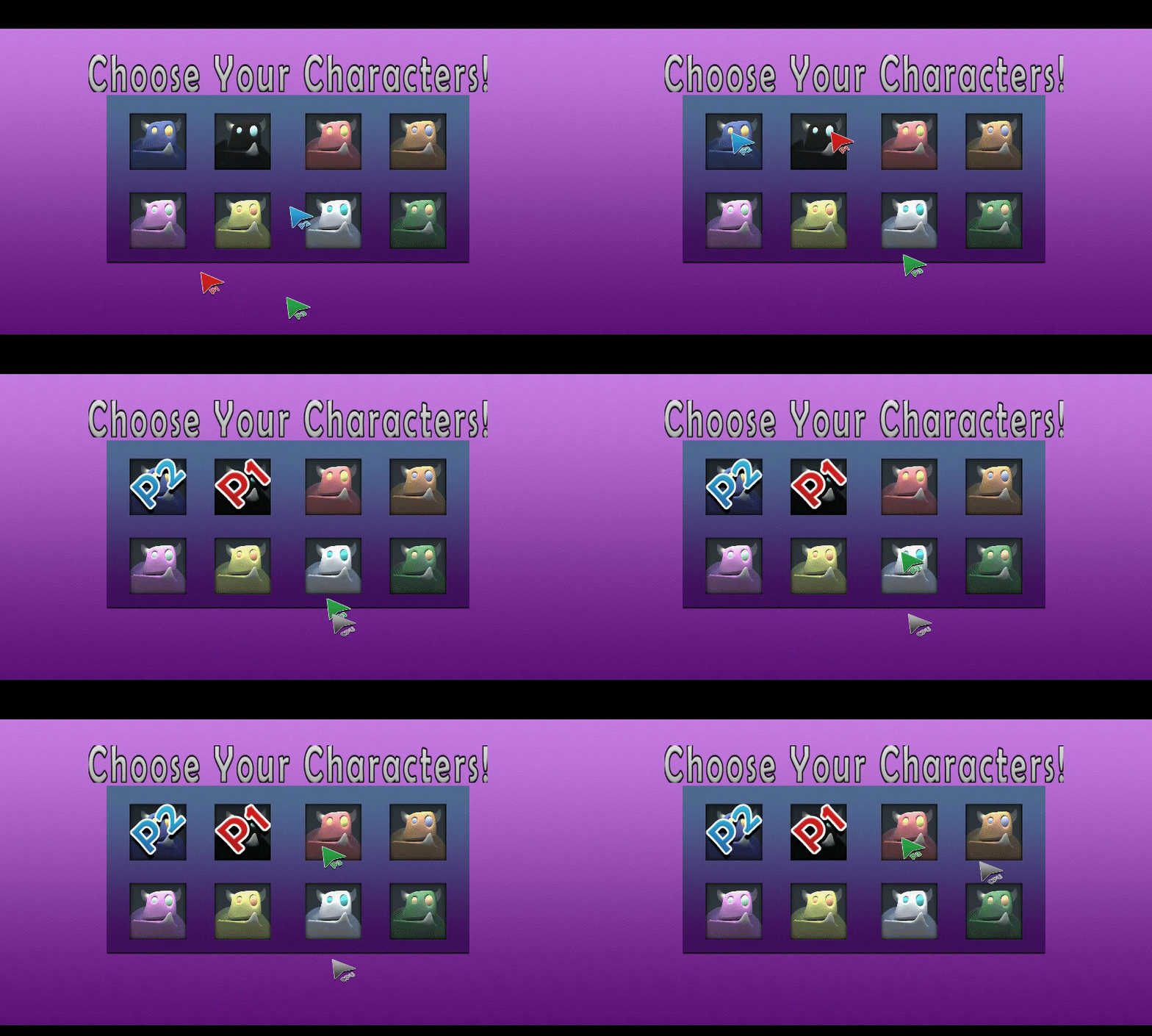
This character select screen script is broken up into two main scripts and an enumerator. The Enumerator acts as a variable for each of the character portraits located to denote each of the 8 planned playable characters and uses it to access certain functions in the largest script in this three script operation, the Character Selection Panel Script. In this script at the start of the character select screen scene, we search the game manager for the number of Computer players and set which pointers will be visible from the start of the scene.
using System.Collections;
using System.Collections.Generic;
using UnityEngine;
using UnityEngine.SceneManagement;
using UnityEngine.UI;
using InControl;
public class CharacterSelectionPanel : MonoBehaviour {
#region Public Variables
[SerializeField]
public int NumCharSelected, NumCPU;
[SerializeField]
public GameObject GamManger;
[SerializeField]
public GameObject [] cursors; //Cursors
[SerializeField]
public GameObject[] charport; //Character Portraits
[SerializeField]
public Sprite[] Overlay; //Sprite that overlays character portraits
[SerializeField]
public Image[] overImage; //The actual images that can overlay the sprite
[SerializeField]
public Sprite Sprnull; //An empty sprite that signifies that the character is not selected yet
#endregion
#region Private Variables
CharacterPortraitEnum.CharChosen PrevCharChosen;
private AudioManager am;
private NativeInputDevice[] Controllers;
#endregion
#region Monobehaviors
// Use this for initialization
void Start()
{
GamManger = GameObject.FindGameObjectWithTag("Manager");
NumCPU = GamManger.GetComponent<GameManager>().numCPU;
NumCharSelected = 0; //Makes sure that we always start the scene with no characters selected
am = GameObject.FindGameObjectWithTag("AudioM").GetComponent<AudioManager>();
Controllers = new NativeInputDevice[4];
for (int i = 0; i < 4; i++)
{
Controllers[i] = GamManger.GetComponent<GameManager>().PlayerControllers[i];
}
switch (NumCPU) //Sets the cursors that are active based upon the number of players
{
//Player 1 at index 0 is always active to start
case 0: //If we have 4 human players and no CPU
cursors[1].SetActive(true);
cursors[2].SetActive(true);
cursors[3].SetActive(true);
break;
case 1: //If we have 3 human players and 1 CPU
cursors[1].SetActive(true);
cursors[2].SetActive(true);
break;
case 2: //If we have 2 human players and 2 CPU
cursors[1].SetActive(true);
break;
default: //If we have 1 player and 3 CPU
break;
}
NumCharSelected = 0; //Always sets the number of characters selected to zero
}
Using the number of CPU players gathered from the game manager which is set in the previous scene where we set the number of players. We use object pooling to set the human players' cursors to active, depending on how many of them there are. Player one's cursor is always set to active because no matter what happens player one will always be a human player and we only concern ourselves with players 2-4. If we have four human players or NumCPU equals 0 we set the first four cursors to Active, if we have 1 CPU player we set the first 3 to Active for 2 we set the first two and one only the 1st cursor remains active which is active from the start of the scene regardless of the number of players chosen because as it stands in every case possible there will always be at least one human player. At the beginning of the script it is important we make sure to set NumCharSelected to 0 due to avoid all possibility of the character select screen prematurely entering the next scene because the game will break if four characters are not selected. We also set the controller array to cut back on the CPU in the Update function.
Now we have this array of cursors, but how exactly do they work. Each of the 7 cursors has a Selector script on it that houses the controls for each individual cursor allowing them to freely select and deselect the characters. In order to control these cursors, we use a plug-in known as InControl in order to aid with the simultaneous use of multiple controllers at once.
using System.Collections;
using System.Collections.Generic;
using UnityEngine;
using UnityEngine.UI;
using InControl; //gets the InControl Plugin
public class Selectors : MonoBehaviour {
#region Public Variables
[SerializeField]
public CharacterPortraitEnum.CharChosen HoverCharacter, ChosenCharacter;
[SerializeField]
public GameObject GamManger;
[SerializeField]
public CharacterSelectionPanel Panel; //The Character Selection Panel is used to access the other scripts
[SerializeField]
public int ControllerIndex, PlayerIndex, PointerIndex;
#endregion
#region Private Variables
NativeInputDevice Controller;
private AudioManager AudioManger;
#endregion
#region Monobehaviors
// Use this for initialization
void Start () {
GamManger = GameObject.FindGameObjectWithTag("Manager");
Controller = GamManger.GetComponent<GameManager>().PlayerControllers[ControllerIndex];
AudioManger = GameObject.FindGameObjectWithTag("AudioM").GetComponent<AudioManager>();
}
// Update is called once per frame
void Update () {
//Moves cursor
if (Controller.GetControl(InputControlType.LeftStickX) != 0)
{
gameObject.transform.Translate(Vector2.right * Controller.GetControl(InputControlType.LeftStickX) * 16);
}
if (Controller.GetControl(InputControlType.LeftStickY) != 0)
{
gameObject.transform.Translate(Vector2.up * Controller.GetControl(InputControlType.LeftStickY) * 16);
}
//Handles Button Presses
if (Controller.GetControl(InputControlType.Action1).WasPressed && HoverCharacter!= CharacterPortraitEnum.CharChosen.None)
{
//Selects Character
ChosenCharacter = HoverCharacter;
HoverCharacter = CharacterPortraitEnum.CharChosen.None;
Panel.A_ButtonWasPressed(ChosenCharacter, PointerIndex, PlayerIndex);
}
if (Controller.GetControl(InputControlType.Action2).WasPressed)
{
//Deselects Character
Panel.B_ButtonWasPressed(PlayerIndex, PointerIndex, ChosenCharacter);
}
}
private void OnTriggerEnter2D(Collider2D other)
{
//sets which character the cursor is hovering over
switch (other.GetComponent<CharacterPortraitEnum>().Who)
{
case CharacterPortraitEnum.CharChosen.Thorg:
HoverCharacter = CharacterPortraitEnum.CharChosen.Thorg;
break;
case CharacterPortraitEnum.CharChosen.Rudy:
HoverCharacter = CharacterPortraitEnum.CharChosen.Rudy;
break;
case CharacterPortraitEnum.CharChosen.Lasair:
HoverCharacter = CharacterPortraitEnum.CharChosen.Lasair;
break;
case CharacterPortraitEnum.CharChosen.Pascal:
HoverCharacter = CharacterPortraitEnum.CharChosen.Pascal;
break;
case CharacterPortraitEnum.CharChosen.Frankie:
HoverCharacter = CharacterPortraitEnum.CharChosen.Frankie;
break;
case CharacterPortraitEnum.CharChosen.EIN:
HoverCharacter = CharacterPortraitEnum.CharChosen.EIN;
break;
case CharacterPortraitEnum.CharChosen.Maw:
HoverCharacter = CharacterPortraitEnum.CharChosen.Maw;
break;
case CharacterPortraitEnum.CharChosen.FunG:
HoverCharacter = CharacterPortraitEnum.CharChosen.FunG;
break;
case CharacterPortraitEnum.CharChosen.None:
HoverCharacter = CharacterPortraitEnum.CharChosen.None;
break;
default:
break;
}
AudioManger.UIButtonTransition(); //Plays Sound when you hover over a new character
}
#endregion
}
After we once again set the game and audio managers we use a Controller Index integer that is set in the Unity Inspector to get and set the controller that controls the cursor that this script would be attached to. Each human cursor is set to one of the controllers that are set in the controller set up scene whereas every single CPU cursor is set to player 1's controller due to that controller always existing and that the CPU cursors are only active one at a time so it would make the most sense to just use one controller. The controls themselves are regulated using if statements to make sure that the functions only activate when the correct buttons are pressed or the left stick moves from its resting position. We use OntriggerEnter2D in order to accurately select the character based upon the character that the cursor is currently hovering over. We don't use OnTriggerExit2D due to it interfering in the character selection process setting the character to none despite the cursor being inside the character portrait and OnTriggerStay being far to taxing on the CPU in a script such as this.
The reason for using an Enum for character portraits is so that it can be much easier to add characters if we decide to add more than the 8 that are currently planned for the initial release and we named each of the possible constants after the names of the characters planned for the game to keep things simple. Enums also allow for the use of switch statements, which are a lot easier for the CPU to handle making it less likely to become bogged down.
Once the A Button is pressed and HoverCharacter is not set to None we call a function on the Character Selection Panel that runs everything that happens when the player selects their character while setting ChosenCharacter and clearing HoverCharacter and passing over the playerIndex and CursorIndex integers.
public void A_ButtonWasPressed(CharacterPortraitEnum.CharChosen Who, int cursorIndex, int PlayerIndex)
{
cursors[cursorIndex].SetActive(false); //Sets the current player handle to not be active
if (cursorIndex == 0) // Sets Player 1 to have sole control over CPU to avoid confusion
{
switch (NumCPU) //Sets the CPU handles to active depending on how many of them there are
{
case 1:
cursors[6].SetActive(true);
break;
case 2:
cursors[5].SetActive(true);
break;
case 3:
cursors[4].SetActive(true);
break;
default:
break;
}
}
else if (cursorIndex == 4 || cursorIndex == 5){
// If a CPU selects a character and there is a CPU in waiting it sets the next CPU in the array to be active
cursors[cursorIndex + 1].SetActive(true);
}
switch (Who)
{
case CharacterPortraitEnum.CharChosen.None:
break;
case CharacterPortraitEnum.CharChosen.Thorg:
UnityEngine.GameObject pPrefab = (GameObject)Resources.Load("BlueThorg");
//loads in the prefab
GamManger.GetComponent<GameManager> ().Players [PlayerIndex] = pPrefab;
//sets the prefab in the game manager
charport[0].GetComponent<CharacterPortraitEnum>().Who = CharacterPortraitEnum.CharChosen.None // Makes it so the selected character can no longer be selected
NumCharSelected++;
//Increases the number of characters selected so that the scene can change
GoToNextScene();
// checks if we can go to the next scene
switch (cursorIndex)
//sets the overlay image on the character select portrait to the player that selected the character
{
case 0:
overImage[0].sprite = Overlay[0]; //P1
break;
case 1:
overImage[0].sprite = Overlay[1]; //P2
break;
case 2:
overImage[0].sprite = Overlay[2]; //P3
break;
case 3:
overImage[0].sprite = Overlay[3]; //P4
break;
case 4:
case 5:
case 6:
overImage[0].sprite = Overlay[4]; //CPU
break;
default:
break;
}
if (PlayerIndex <= 3 - NumCPU)
{
GamManger.GetComponent<GameManager().Players[PlayerIndex].GetComponent<Player>().isCPU = false;
//failsafe to make sure the CPU remain CPU
}
break;
...
public void GoToNextScene()
{
if (NumCharSelected > 3 && GamManger.GetComponent<GameManager>().Players[0] != null &&
GamManger.GetComponent<GameManager>().Players[1] != null && GamManger.GetComponent<GameManager>().Players[2] != null &&
GamManger.GetComponent<GameManager>().Players[3] != null)
{
SceneManager.LoadScene(4); // loads the board selection menu
}
}
This is only a small portion of the much larger function due to it functioning almost exactly the same for each character. The basic gist of this function is to run through all of the necessary procedures needed for selecting a character.
First, the function disables the cursor that activated it and then checks the current cursor's Index which is passed over when the function is called. If the current Index is set to 0, signifying the first player, the function then activates a CPU cursor depending on the number of CPU which it gets from the NumCPU variable that was set during the start of the script. 3 CPU activate index 4, 2 CPU will activate index 5 and 1 CPU will activate index 6. The CPU cursor at Index 6 will always be the last CPU active and as a result, the CPUs will activate in ascending order after the initial set up: Index 4 will activate Index 5 and Index 5 will activate Index 6.
After the cursors are set up, we then get into the meat of the function and the actual setting of the players chosen character. Using a Switch statement with the CharChosen variable that was brought in we can accurately set the character by creating a case for each of the different characters. In order to set the character, you first must load in the prefab from the resources folder or wherever the prefab is placed in by saving it to a GameObject variable. Then through the game manager, we grab the Players game object array and set the game object at index PlayerIndex, the player that pushed the A button, to the GameObject variable we created when loading the prefab, named pPrefab.Once this is done we add 1 to the NumCharSelected integer variable and then run the GoToNextScene() function that checks whether or not we can transition to the next scene. By checking if Number of characters selected is greater than 4 and by checking, if all four player slots have been filled only then will we be allowed to transition into the next scene.
Now that the player is set we must prevent the character from being chosen again, so we set the character portrait's CharChosen variable to none. For the character of Thorg, this is index zero of the character portrait array as well as the portrait overlay array which I named OverImage. Then using the CursorIndex in a switch statement, I set the OverImage Sprite to be equal to the sprite that corresponds with the human or CPU player that selected the character. You can clearly see this working in the GIF above
If a player can select a character then they should also be able to deselect their character. To allow this I created another function that runs when a player pushes the Action2 button or the B button on an Xbox controller
public void B_ButtonWasPressed(int PlayerThatPushedB, int cursorIndex, CharacterPortraitEnum.CharChosen CharChosen) //This Function allows players to go back and change their character
{
if (GamManger.GetComponent<GameManager>().Players[PlayerThatPushedB] != null)
{
GamManger.GetComponent<GameManager>().Players[PlayerThatPushedB] = null; //Deselects the player
{
if (NumCharSelected <= 0) //If no characters are selected and the B Button is pressed
{
SceneManager.LoadScene(2); //Load the Scene where we set the number of players
}
NumCharSelected--;
switch (cursorIndex)
{
case 0:
case 1:
case 2:
case 3:
if (!cursors[cursorIndex].activeInHierarchy)
{
switch (cursors[cursorIndex].GetComponent<Selectors>().ChosenCharacter)
{
case CharacterPortraitEnum.CharChosen.Thorg:
overImage[0].sprite = Sprnull; //Sets the overlay sprite to a transparent one
charport[0].GetComponent<CharacterPortraitEnum>().Who = CharacterPortraitEnum.CharChosen.Thorg;
//Allows character portrait to be selectable again
break;
case CharacterPortraitEnum.CharChosen.Rudy:
overImage[1].sprite = Sprnull; //Sets the overlay sprite to a transparent one
charport[1].GetComponent<CharacterPortraitEnum>().Who = CharacterPortraitEnum.CharChosen.Rudy;
//Allows character portrait to be selectable again
break;
case CharacterPortraitEnum.CharChosen.Lasair:
overImage[2].sprite = Sprnull; //Sets the overlay sprite to a transparent one
charport[2].GetComponent<CharacterPortraitEnum>().Who = CharacterPortraitEnum.CharChosen.Lasair;
//Allows character portrait to be selectable again
break;
case CharacterPortraitEnum.CharChosen.Pascal:
overImage[3].sprite = Sprnull; //Sets the overlay sprite to a transparent one
charport[3].GetComponent<CharacterPortraitEnum>().Who = CharacterPortraitEnum.CharChosen.Pascal;
//Allows character portrait to be selectable again
break;
case CharacterPortraitEnum.CharChosen.Frankie:
overImage[4].sprite = Sprnull; //Sets the overlay sprite to a transparent one
charport[4].GetComponent<CharacterPortraitEnum>().Who = CharacterPortraitEnum.CharChosen.Frankie;
//Allows character portrait to be selectable again
break;
case CharacterPortraitEnum.CharChosen.EIN:
overImage[5].sprite = Sprnull; //Sets the overlay sprite to a transparent one
charport[5].GetComponent<CharacterPortraitEnum>().Who = CharacterPortraitEnum.CharChosen.EIN;
//Allows character portrait to be selectable again
break;
case CharacterPortraitEnum.CharChosen.Maw:
overImage[6].sprite = Sprnull; //Sets the overlay sprite to a transparent one
charport[6].GetComponent<CharacterPortraitEnum>().Who = CharacterPortraitEnum.CharChosen.Maw;
//Allows character portrait to be selectable again
break;
case CharacterPortraitEnum.CharChosen.FunG:
overImage[7].sprite = Sprnull; //Sets the overlay sprite to a transparent one
charport[7].GetComponent<CharacterPortraitEnum>().Who = CharacterPortraitEnum.CharChosen.FunG;
//Allows character portrait to be selectable again
break;
case CharacterPortraitEnum.CharChosen.None:
break;
default:
break;
}
cursors[cursorIndex].SetActive(true);
}
else
{
for (int i = 0; i >= 3 ; i++)
{
GamManger.GetComponent<GameManager>().Players[i] = null;
}
SceneManager.LoadScene(2);
//if Player 2, 3, or 4 press B while their player handle is active it loads the number of players scene
}
break;
...
case 5:
cursors[cursorIndex].SetActive(false);
if (NumCPU==3)
{
switch (cursors[4].GetComponent<Selectors>().ChosenCharacter)
{
case CharacterPortraitEnum.CharChosen.Thorg:
overImage[0].sprite = Sprnull; //Sets the overlay sprite to a transparent one
charport[0].GetComponent<CharacterPortraitEnum>().Who = CharacterPortraitEnum.CharChosen.Thorg;
break;
case CharacterPortraitEnum.CharChosen.Rudy:
overImage[1].sprite = Sprnull; //Sets the overlay sprite to a transparent one
charport[1].GetComponent<CharacterPortraitEnum>().Who = CharacterPortraitEnum.CharChosen.Rudy;
break;
case CharacterPortraitEnum.CharChosen.Lasair:
overImage[2].sprite = Sprnull; //Sets the overlay sprite to a transparent one
charport[2].GetComponent<CharacterPortraitEnum>().Who = CharacterPortraitEnum.CharChosen.Lasair;
break;
case CharacterPortraitEnum.CharChosen.Pascal:
overImage[3].sprite = Sprnull; //Sets the overlay sprite to a transparent one
charport[3].GetComponent<CharacterPortraitEnum>().Who = CharacterPortraitEnum.CharChosen.Pascal;
break;
case CharacterPortraitEnum.CharChosen.Frankie:
overImage[4].sprite = Sprnull; //Sets the overlay sprite to a transparent one
charport[4].GetComponent<CharacterPortraitEnum>().Who = CharacterPortraitEnum.CharChosen.Frankie;
break;
case CharacterPortraitEnum.CharChosen.EIN:
overImage[5].sprite = Sprnull; //Sets the overlay sprite to a transparent one
charport[5].GetComponent<CharacterPortraitEnum>().Who = CharacterPortraitEnum.CharChosen.EIN;
break;
case CharacterPortraitEnum.CharChosen.Maw:
overImage[6].sprite = Sprnull; //Sets the overlay sprite to a transparent one
charport[6].GetComponent<CharacterPortraitEnum>().Who = CharacterPortraitEnum.CharChosen.Maw;
break;
case CharacterPortraitEnum.CharChosen.FunG:
overImage[7].sprite = Sprnull; //Sets the overlay sprite to a transparent one
charport[7].GetComponent<CharacterPortraitEnum>().Who = CharacterPortraitEnum.CharChosen.FunG;
break;
case CharacterPortraitEnum.CharChosen.None:
break;
default:
break;
}
cursors[4].SetActive(true);
}
else if (NumCPU == 2)
{
switch (cursors[0].GetComponent<Selectors>().ChosenCharacter)
{
case CharacterPortraitEnum.CharChosen.Thorg:
overImage[0].sprite = Sprnull; //Sets the overlay sprite to a transparent one
charport[0].GetComponent<CharacterPortraitEnum>().Who = CharacterPortraitEnum.CharChosen.Thorg;
break;
case CharacterPortraitEnum.CharChosen.Rudy:
overImage[1].sprite = Sprnull; //Sets the overlay sprite to a transparent one
charport[1].GetComponent<CharacterPortraitEnum>().Who = CharacterPortraitEnum.CharChosen.Rudy;
break;
case CharacterPortraitEnum.CharChosen.Lasair:
overImage[2].sprite = Sprnull; //Sets the overlay sprite to a transparent one
charport[2].GetComponent<CharacterPortraitEnum>().Who = CharacterPortraitEnum.CharChosen.Lasair;
break;
case CharacterPortraitEnum.CharChosen.Pascal:
overImage[3].sprite = Sprnull; //Sets the overlay sprite to a transparent one
charport[3].GetComponent<CharacterPortraitEnum>().Who = CharacterPortraitEnum.CharChosen.Pascal;
break;
case CharacterPortraitEnum.CharChosen.Frankie:
overImage[4].sprite = Sprnull; //Sets the overlay sprite to a transparent one
charport[4].GetComponent<CharacterPortraitEnum>().Who = CharacterPortraitEnum.CharChosen.Frankie;
break;
case CharacterPortraitEnum.CharChosen.EIN:
overImage[5].sprite = Sprnull; //Sets the overlay sprite to a transparent one
charport[5].GetComponent<CharacterPortraitEnum>().Who = CharacterPortraitEnum.CharChosen.EIN;
break;
case CharacterPortraitEnum.CharChosen.Maw:
overImage[6].sprite = Sprnull; //Sets the overlay sprite to a transparent one
charport[6].GetComponent<CharacterPortraitEnum>().Who = CharacterPortraitEnum.CharChosen.Maw;
break;
case CharacterPortraitEnum.CharChosen.FunG:
overImage[7].sprite = Sprnull; //Sets the overlay sprite to a transparent one
charport[7].GetComponent<CharacterPortraitEnum>().Who = CharacterPortraitEnum.CharChosen.FunG;
break;
case CharacterPortraitEnum.CharChosen.None:
break;
default:
break;
}
cursors[0].SetActive(true);
}
break;
...
Similar to the last script only a portion of this script is being shown due to the repetitive nature of this switch statement. If no characters are selected and somebody pushes the B button then the scene will back out and load the scene where you would select how many human players are playing, which in this case is scene 2. The same also happens if a human player has no character selected and they push the B button. if other players are selected this will set every single player to null before exiting the scene to ensure that we get a fresh start when we re-enter the scene. I place this here to cut back on the time it takes to set up the scene. Humans are the only ones who can back out of this scene because if it wasn't this way the game would back out every single time the B button is pressed which would cause frustration in players.
If a player is selected, the function will deselect that player by getting the players gameObject array from the Game Manager and setting the player at index PlayerThatPushed_B to null. PlayerThatPushed_B is equal to the Player's number minus 1. For example, Player 1 = Index 0 so PlayerThatPushed_B should equal 0. This variable is set in the Unity Inspector for each Cursor as it will never change throughout the entirety of the game.
We then get to the massive switch statement that allows the character that is selected to be selected again because remember we made it so two players could not select the same character. in order to set this back to normal we have to get the ChosenCharacter variable that exists on each of the cursors, so we pass this over when the player pushes B. Once passed it over we use it as the condition for the switch statement and then depending on its value we set that corresponding Character Portrait's CharacterPortraitEnum called Who, as in Who is this back to what it originally was and then sets that overlay sprite to a transparent sprite called SprNull.
CPU's, however, operate slightly differently. If their pointer is active they have to disable it and then deselect the character behind them and then set that player's cursor to active. Case 5 is a perfect example of what I mean. For this particular cursor, it has to look at the number of CPUs to determine which cursor to activate. If the number of CPU's is equal to 3 it has to both deselect cursor 4's character and re-activate it while deactivating itself effectively switching control over to it. If NumCPU is equal to 2 however it has to deselect player 1's character and give control back to player 1 by deactivating itself and reactivating player 1's cursor. It is done in this way because of the nature of CPU controlled characters in many games they are selected after every player selects their character.
The final function we need to discuss is the Update function in the CharacterSelectPanel Script. This is because it is responsible for allowing the human players to deselect their characters despite being deactivated
void Update () {
// If Human Controllers that aren't active press B
if (Controllers[0].Action2.WasPressed && cursors[0].activeSelf == false && NumCPU == 0)
{
B_ButtonWasPressed(0, 0, cursors[0].GetComponent<Selectors>().ChosenCharacter);
}
if (Controllers[1] != null)
{
if (Controllers[1].Action2.WasPressed && cursors[1].activeSelf == false)
{
B_ButtonWasPressed(1, 1, cursors[1].GetComponent<Selectors>().ChosenCharacter);
}
}
if (Controllers[2] != null)
{
if (Controllers[2].Action2.WasPressed && cursors[2].activeSelf == false)
{
B_ButtonWasPressed(2, 2, cursors[2].GetComponent<Selectors>().ChosenCharacter);
}
}
if (Controllers[3] != null)
{
if (Controllers[3].Action2.WasPressed && cursors[3].activeSelf == false)
{
B_ButtonWasPressed(3, 3, cursors[3].GetComponent<Selectors>().ChosenCharacter);
}
}
}
As I stated above the first four if statements in this script allow the players to deselect their characters when they are not active. For every player besides player 1, the script first checks whether or not a controller actually exists then if one does it will run the inner if statement. Because player 1 should always have a controller it only has the inner If statement that in addition to only being activated if the cursor is not active the number of CPU's have to equal 0 because player 1 already accounts for this when there are any CPUs at all because it is the CPUs that will deselect player 1 normally.